


Travel Journal: Blog & Diary
3.913.00 Reviews
App Specs
- Version
- 2.3.2
- Updated On
- License
- Free
- Downloads
- 10,000+
- Developer
- Travel Diaries BV
- Categories
- Travel & Local
- Platform
- Android
Screenshots







 Analysis by AppCompare
If you’re choosing how to keep a travel record, I’d start with a simple question: do you want a place to collect the story of a trip, or do you mainly need somewhere to store photos and practical notes? I find those goals often get mixed together. A camera roll is good at keeping images, while notes apps are quick for logistics; neither automatically turns a holiday into something you’ll enjoy rereading. Travel Journal: Blog & Diary is aimed at that middle ground, where memories, media, and a written account belong together.
Choose it for the record you want to keep
My main decision test is whether I’ll actually write while travelling. If I want to record a few impressions each day and connect them to pictures or places, a dedicated journal makes more sense than leaving everything in separate folders. If I only need a packing list, directions, or a shared itinerary, a general notes or travel-planning app is likely the simpler tool. This app is at its best when the trip itself is the subject, rather than a collection of tasks to complete.
It’s a free travel and local app from Travel Diaries BV, and its focus is personal trip storytelling. It has a 3.9 average from around 136 ratings and over 10,000 installs, which gives a prospective user some context without telling the whole story of how it will fit their habits. It’s rated for everyone, runs on Android 8.0 or later, and its current version is 2.2.85. I’d treat those details as a practical compatibility check, then decide based on whether its journal-first approach suits the way I travel.
Where a trip journal earns its place
I find a travel journal earns its place when it helps me remember not just what I saw, but why a particular moment mattered. In this section, I’d look at the small choices that make entries easier to revisit later, including how to keep a record useful without turning a holiday into a writing assignment.
First Impressions: Setting Up Your Travel Companion
As soon as I launched the app, I was greeted with a clean and intuitive interface that screamed, "Let’s get your adventures recorded!" Setting up your first entry is a breeze. You can start by adding a new trip, and within that, create individual entries for each day or moment you want to capture. The UI is straightforward, making navigation as easy as a walk in the park.
That trip-and-entry structure is useful beyond keeping a diary in chronological order. I’d use a separate entry for a memorable meal, a long transfer, or a day that changed plans, rather than squeezing every thought into one end-of-trip essay. It also makes the journal easier to revisit later: if I remember the afternoon at a particular stop, I can look for that moment instead of searching one enormous block of text. A small workflow tip is to make a short entry while the details are fresh, then add a fuller reflection when there’s more time.
Features That Make It Stand Out
The Travel Journal: Blog & Diary app isn’t just about text entries. Oh no, it’s a multimedia powerhouse that lets you attach photos, videos, and even audio recordings. Imagine capturing the sound of the bustling market in Marrakech or the serene waves on a Thai beach and having those memories tied to your written reflections. It’s like having a scrapbook on steroids.
Worth Reading Before You Choose

Switching to Android Auto Means Rethinking Your Driving Routine

Google Calendar Makes a Crowded Week Easier to Manage

Baby Panda World Brings Quick Play to Modern Phones, but Its Game Library Feels Busy

ESPN’s Live Game View Makes Following Close Games Easier

QuizzLand Review: A Good Fit for Short Trivia Breaks, Not Every Player

Basketball Stars: Multiplayer Is Fast, but Can It Recover When Matches Go Wrong?
The useful distinction here is that media can serve as a prompt for the writing, rather than just decoration. A photo might preserve what a street looked like, while a sentence records why I turned down it or how the day felt. Audio can be especially handy when typing would interrupt a moment: I could save a quick spoken recollection after a concert or while sitting on a train, then write a clearer account later. I would still keep the recording focused; attaching everything without a note can leave a future reader with a pile of files and no explanation.
There is a trade-off to multimedia journaling. Videos and audio can make an entry feel vivid, but they also take more effort to sort through than a handful of selected images and a clear caption. When travelling, I’d add the media that helps tell the story, not every clip on my phone. That makes the journal easier to browse and gives each entry a more deliberate point of view.
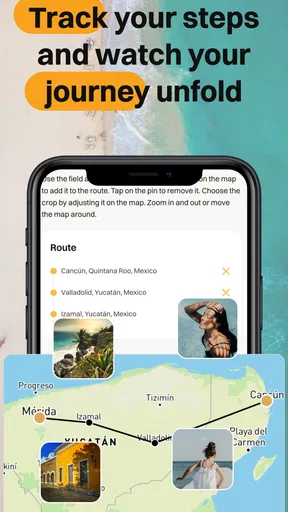
One of my favorite features is the map integration. You can pin locations to your entries, so you’re not just reading about your journey; you’re literally seeing it unfold on a map. This is perfect for visual folks who love to see where they’ve been and plan where they’re going next.
For a practical routine, I’d add a location while the place is still easy to identify, especially after a day with several stops. A map can later help connect a meal, a view, and a detour that might otherwise blur together. I wouldn’t treat it as a replacement for navigation, though: its role in this kind of app is to give the memories geographic context, not to manage every live travel decision.
Customization Galore
Now, if you’re detail-oriented like me, you’ll appreciate the customization options. The app lets you choose from various themes and fonts, so your journal can reflect your personality. Plus, you can tag entries with keywords, making it super easy to find that one day in Paris where you had the best croissant of your life.
Tags become more valuable after a few trips, when browsing strictly by date is no longer enough. I’d keep them consistent and useful—perhaps a small set for food, transport, or favourite places—rather than inventing a new label for every entry. That’s a quiet but important trade-off: tagging takes a moment during the trip, but a consistent system can save time when looking back. Themes and fonts are a more personal choice; I’d pick a readable style first and treat appearance as a finishing touch.
Sharing is Caring
Not all adventures are meant to be kept private, and the app gets that. You can easily convert your entries into a blog post, complete with your photos and videos. This feature is awesome if you want to share your journey with friends, family, or even a wider audience online. The app provides a seamless export to popular blogging platforms, so you’re not stuck copying and pasting your way through the internet.
This works best when I think of a private journal entry and a public story as different drafts. A note about a delayed connection or a tiring day may be valuable to me without belonging in a polished post. Before sharing, I’d review the text and attached media for personal details, names, and anything I only intended to keep for myself. That extra edit is worthwhile: the convenience of turning a journal into a blog should not mean every raw thought needs to be published.
Compared with writing directly in a blogging tool, a travel journal can make it easier to capture moments in the order they happen, then shape selected entries for other people afterward. On the other hand, someone who already publishes regularly and wants complete control over a site’s layout may prefer to compose in their usual publishing platform. I see this app’s appeal as reducing the distance between remembering and sharing, rather than replacing every writing tool.
Safety First: Your Memories are Secure
We all know the horror of losing precious data. The app offers a cloud backup option to ensure that your memories are safe and sound, even if your phone decides to take an unexpected swim in the ocean. And for those who value privacy, you can lock the app with a password or fingerprint, keeping your entries secure from prying eyes.
I’d make backup and privacy part of my setup routine, not something to think about only after a phone problem. A device lock can help protect a journal from casual access, while backup matters if the phone is lost or damaged. They solve different concerns, so I’d check that the protection options I want are enabled before relying on the app as the only home for irreplaceable memories. For especially important photos, keeping a separate copy is a sensible habit regardless of which journal I use.
The Little Things That Matter
Sometimes, it’s the small details that make an app truly great. The app offers daily prompts, which are perfect for those moments when you’re stuck and don’t know what to write. Think of them as little nudges to get your creativity flowing. There are also mood trackers, because let’s be real, not every travel day is sunshine and rainbows, and it’s important to capture those moments too.
Prompts and mood tracking can help make an honest journal rather than a highlight reel. On a busy day, I might answer one prompt with a few lines about a conversation or a change of plan instead of forcing myself to write a full narrative. A mood note also adds context when I revisit an entry months later: the same destination can feel very different depending on fatigue, weather, or the people I’m with. The trick is to use these tools when they help, not turn journaling into another holiday obligation.
A realistic way to use it on a trip
Picture a day that begins with a planned walk, gets interrupted by rain, and ends with an unexpectedly good meal. I’d make a brief entry during a quiet break, attach one or two photos that explain the day, and add a location while I still remember the restaurant’s place in the route. Later, I could use a prompt to capture what changed my plans and tag the entry so it is easy to find among other food or city memories. That small routine is more likely to survive a busy itinerary than waiting until the last night to reconstruct the whole trip.
For someone travelling with family or friends, the same approach can make a shared trip easier to remember, but I’d agree first on what belongs in a journal and what should stay private. The app is a better fit for one person who wants to curate a story than for a group that needs a live, collaborative schedule. If everyone mainly needs current meeting times or bookings, a shared planning tool should come first; the journal can preserve the experiences around those plans.
When another kind of app is a better fit
The usual alternatives each solve a different problem. A camera roll is fast and familiar, but it can leave the reason behind a photo unclear. A notes app is flexible for lists and quick thoughts, though entries may remain disconnected from a trip narrative. A blogging platform is designed for publishing, while a printed photo book is better suited to a finished keepsake. Travel Journal sits between these choices: it encourages a record that can include text and media, with a path toward sharing or a printed book, but it may be more structure than someone wants for a short weekend or a trip they barely document.
If my priority were turn-by-turn directions, booking management, or a collaborative itinerary, I’d choose a tool built around that job instead. If I simply want to take photos and let the phone’s gallery sort them, the extra step of writing and organizing entries may feel unnecessary. I’d also think twice if I tend to abandon journaling after the first day; the best feature set is not useful if the capture habit does not fit my travel style.
What to consider before moving an existing journal
Switching from scattered notes or a long-running journal has a real cost: the old material does not become organized just because I install a new app. I’d start with the next trip rather than trying to migrate years of memories in one sitting. If there are older photos I care about, I could add only the most meaningful ones and write a short context note, leaving the archive intact where it already lives. This avoids turning a fresh travel habit into a large housekeeping project.
There is also a financial point to keep in mind. The app is free to download, with in-app purchases ranging from $7.99 to $89.99 per item. I’d begin with the free experience and only consider a purchase after identifying a specific need, such as a feature I expect to use regularly. That makes the decision less about buying every available option and more about whether the app’s workflow is valuable to me over time.
Final Verdict: A Must-Have for Every Traveler
In a world where experiences are often fleeting, the Travel Journal: Blog & Diary app offers a way to hold onto them just a little longer. Its user-friendly interface, rich multimedia capabilities, and customization options make it a standout choice for anyone looking to document their travels. Whether you’re a casual traveler or a seasoned globetrotter, this app is sure to become your trusty sidekick on all your adventures.
So, if you haven’t already, give it a whirl. Your future self will thank you as you scroll through your beautifully crafted journal, reminiscing about past adventures and planning new ones. Happy traveling!
My recommendation
I’d recommend it to travellers who enjoy making a personal record and want more structure than a photo gallery, especially those who like pairing short reflections with images, sound, or places. It can also suit someone who hopes to turn selected memories into a blog or printed photo book later. I would skip it if I only need logistics, dislike writing on the go, or already have a simple system I reliably use. For me, its strongest case is not that it replaces every travel app, but that it gives the story of a trip a home of its own.
Pros
- User-friendly interface for easy navigation.
- Supports offline entry saving.
- Customizable templates for personal touch.
- Integrates multimedia seamlessly.
- Syncs across multiple devices.
Cons
- Limited free storage space.
- Some features locked behind paywall.
- Occasional sync delays reported.
- Lacks advanced editing tools.
- No direct social media sharing.
FAQs for Travel Journal: Blog & Diary
What is Travel Journal: Blog & Diary and how does it work?
Travel Journal: Blog & Diary is an app designed for travelers who want to document their journeys. It allows users to create detailed blogs and diaries, complete with photos and maps. You can write entries offline, and they sync automatically when you reconnect to the internet, making it perfect for remote locations.
Is Travel Journal: Blog & Diary free to use, or are there in-app purchases?
The app is free to download and offers basic features at no cost. However, there are in-app purchases available for premium features, such as additional storage, advanced editing tools, and customization options. These purchases enhance the user experience but are completely optional.
Can I share my travel entries with others using the app?
Yes, you can easily share your travel entries with friends and family. The app provides options to share via social media, email, or direct links. You can also keep entries private if you prefer, offering full control over your privacy and sharing preferences.
How secure is my data on Travel Journal: Blog & Diary?
The app prioritizes user privacy and data security by using encryption for all stored data. You can also set up a password or use biometric authentication for added security. Regular updates and security patches ensure that your information remains safe while using the app.
Does Travel Journal: Blog & Diary require an internet connection to function?
No, the app does not require a constant internet connection. You can write and save entries offline, and they will sync automatically once you reconnect to the internet. This feature makes it ideal for travelers exploring areas with limited connectivity.


